The final system is shown in the above system diagram. The system used USBIP to realize the wifi robot arm control. Arduino Yun is the USBIP server and also the access point. The PC is the USBIP client.
The PC is connected to the wifi network established by the arduino Yun board so that USBIP server (Yun) and USBIP client (PC) is in the same network.
On the server side, robot arm is shared on the USBIP server. The client PC could receive the USB device. When the client received the USB device, PC will show that a USB device is connected. Actually it is a virtual USB device. Though the robot arm is physically connected to the server: Yun board, it could be controlled by the client PC.
For demonstration please check out our "Demo video" post \(^o^)/
Blog for Year 2 project of robot arm control over wifi from University of Liverpool
Friday, 28 February 2014
Friday, 21 February 2014
Demo video
Difficulties and solutions
Week 1: There were no big problems. The most important work was to have a basic concept of how to control the robot arm with wifi and get familiar with the controlling of the robot, which include the using of the control software: "cyton viewer" and controlling by command lines. In addition, the architecture of Yun board should be known as well.
Week 2: Under the hard working of the first week, we could control the robot by cyton viewer with different handle system and have a good knowledge of the yun board, but we were confused to control the robot by command lines. Furthermore, the largest problem was the basic method of controlling by wifi was denied by the professor. It was really hard to construct the architecture of the controlling because of the limited abilities and unknown difficulties that would be met. For the first methods, we managed to install ROS program to the yun board, and with ssh terminal, the robot arm could be controlled over wifi.The problem come that we failed to install the program to the board. By enquiring to the professor, our method was completely denied. It is necessary to look for another available method as soon as possible.
Week 3: It would be the most terrible week we have met because we spent a whole week to find an available solution but failed. The only progress was the error of controlling by command line was found under the help of the researcher and the robot could be successful controlled through command lines. We planed to find an appropriate communication protocol to construction the connection. The researcher recommended us ttyd, telnet and rem serials but all failed. We researched more resources as many as possible such as the wifi protocol 802.11 and net work programing. Another problem could be that the proffesor was very angry with our work and we were stressed out and felt hopeless. The only solution might be to continue researching, spend more time as well as insistency.
Week 4: Through a plenty of researching and attempting, things went better this week, when we applied usbip, it was found that we could use a computer to control the robot by connecting another computer with usb cable under the same wifi. In this case, we trying to compile and install the program to the yun board by modifying the source code. Through a whole night compiling, there were two errors occurred. In this case, a whole day was spent to modify the code. Eventually, the program was installed on the board the the robot was controlled well with cyton viewer.
Week 2: Under the hard working of the first week, we could control the robot by cyton viewer with different handle system and have a good knowledge of the yun board, but we were confused to control the robot by command lines. Furthermore, the largest problem was the basic method of controlling by wifi was denied by the professor. It was really hard to construct the architecture of the controlling because of the limited abilities and unknown difficulties that would be met. For the first methods, we managed to install ROS program to the yun board, and with ssh terminal, the robot arm could be controlled over wifi.The problem come that we failed to install the program to the board. By enquiring to the professor, our method was completely denied. It is necessary to look for another available method as soon as possible.
Week 3: It would be the most terrible week we have met because we spent a whole week to find an available solution but failed. The only progress was the error of controlling by command line was found under the help of the researcher and the robot could be successful controlled through command lines. We planed to find an appropriate communication protocol to construction the connection. The researcher recommended us ttyd, telnet and rem serials but all failed. We researched more resources as many as possible such as the wifi protocol 802.11 and net work programing. Another problem could be that the proffesor was very angry with our work and we were stressed out and felt hopeless. The only solution might be to continue researching, spend more time as well as insistency.
Week 4: Through a plenty of researching and attempting, things went better this week, when we applied usbip, it was found that we could use a computer to control the robot by connecting another computer with usb cable under the same wifi. In this case, we trying to compile and install the program to the yun board by modifying the source code. Through a whole night compiling, there were two errors occurred. In this case, a whole day was spent to modify the code. Eventually, the program was installed on the board the the robot was controlled well with cyton viewer.
Wednesday, 19 February 2014
Week 4 progress
Week 4 is crucial for the project because the team achieved progress and Finally realized the system.
The previous ttyd method failed because ttyd is out-dated and no-longer support on the OS now. We then use "remserial" to replace "ttyd". It failed again in that it seems difficult to run on Arduino Yun's Build in Linino OS.
The method should be changed again. Following showed another alternative plan.
In the Plan, two Aduino Yun board was used.
First step: the Arduino Yun is connected to the computer via USB and its USB host is connected with the robot arm. The Arduino Yun played the role as the USB cable as it is just act as a connection between the Robot Arm and the computer. The Arduino Yun should be programmed to realize the function.
Second step: Two Yun is programmed to communicate with each other through wifi. One is the server and another one is the client.
Third step: PC --Yun and Robot--Yun send and receive data streams. But wifi network send and receive packets of strings. Data streams and Packets of strings should meet an agreement. This part is challenging.
Fourth step: This is might an additional output of the project. Two Yun wifi online chatting system might be established using this method.
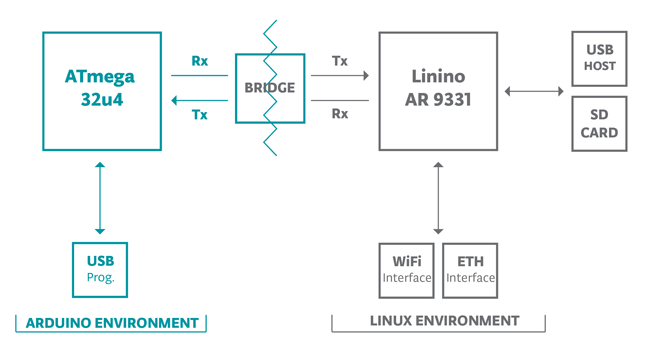
Unfortunately, the method failed again. The Yun's system diagram (available from official site: http://arduino.cc/en/uploads/Main/BridgeInShort.png) is the following.
It seems that the method's first part is very hard to realize because of the limitation of the architecture. But it is possible to establish the wifi connection within LINUX environment.Thus, the final method is generated. The method is called USBIP. It is completely open source and could share USB device over IP. Of course, the technology could also be used in wifi. The USBIP project site could be accessed via: http://usbip.sourceforge.net/
The system diagram is modified.
First step: Since the robot arm is a usb device, the first step is to establish the wifi connection of two pcs and they can share the usb device.
Second step: the yun is acted as the server and the pc is the client. the yun can share its usb device over wifi to the computer.
In this method, the USBIP client used is the Windows PC with windows 8.1 Pro. Server computer runs ubuntu 12.04. The server and client packages could be downloaded from the USBIP project site.
There are two problems with this method.
First, the USBIP has not been updated for a long time. The latest Linux USBIP version dated back to 2009. It does not support ubuntu 12.04, but only ubuntu 10.04. This is the problem with the driver. The team recompiled the driver software based on the kernel and the problem is solved.
Second, the USBIP windows client and linux server version mismatch. Client version is 1.1.0 but server version is 1.0.6. The team viewed the code and changed the version information and finally they matched with each other.
The USBIP between two PCs are successful. Next challenging problem is that how to install USBIP into Yun's Linino OS. Cross compiling is used here. USBIP is compiled on PC into IPK files and stored into SD card. Then, SD card is pluged into Arduino Yun board and USBIP is installed into linino from the SD card.
The system is successful! :) We managed to control the robot arm over wifi using cyton viewer software (official robot arm control software by Robai).
Saturday, 15 February 2014
Week 3 progress
This week we changed our way of realizing the project. The idea used in week 2 was that we tried to install the ROS program (robot control program) in Arduino Yun and access the Yun board via SSH terminal. But this is not in agreement with the supervisior. The supervisior suggested that the team should still control the robot via the cyton viewer software. The graphical interface should not be abandoned and our method sacrifised the graphical interface.
With the help of the lab researcher, we modified the project and now the process changed.
In this method, the first step is to connect two PCs. One is the server and the another one is the client. The connected two PCs could connect each other, send and receive data. They are connected either using ttyd, telnet or remserial method.
The second step is to connect the PC and the Arduino Yun. They are connected using the same method: either ttyd or telnet. Yun could receive data and send back to the server PC.
The third step is based on the second step, Yun is connected to the robot arm and realize the wifi control of the robot.
With the help of the lab researcher, we modified the project and now the process changed.
In this method, the first step is to connect two PCs. One is the server and the another one is the client. The connected two PCs could connect each other, send and receive data. They are connected either using ttyd, telnet or remserial method.
The second step is to connect the PC and the Arduino Yun. They are connected using the same method: either ttyd or telnet. Yun could receive data and send back to the server PC.
The third step is based on the second step, Yun is connected to the robot arm and realize the wifi control of the robot.
Sunday, 9 February 2014
Week 2 progress
The team tried to access the Arduino Yun's linino operating system which is built inside. Linino is a linux based operating system designed for yun. We are trying to install the ROS program (Robot control program) on the little yun board. If this was done, the robot arm could be controlled over wifi. We managed to access via ssh terminal. But the ROS program could not be installed inside the OS. This is the technical difficulty that we face.
Saturday, 8 February 2014
Role Allocation
Mengxin Xu: Project manager
Zhaohao Zeng: Designer
Yongdan Xu: Implementer
Shuai Yang: Technical Writer
Zhaohao Zeng: Designer
Yongdan Xu: Implementer
Shuai Yang: Technical Writer
Title
|
Role
|
Responsibilities
|
Project Manager
|
Responsible for developing, in
conjunction with the supervisor,the project scope. The project manager ensures that the project is delivered on time and to the required standards.
|
|
Designer
|
Designing the system (the circuit, the code..etc).
|
|
Implementer/Developer
|
Implement the suggested design
|
|
Technical Writer
|
Documenting the project progress and deliverables.
|
|
Work plan
The work is divided into three parts.
First part is to establish the connection between two PCs over wifi. The two PCs could send and receive orders from another computer.
Second part is to establish the connection between the PC and the arduino yun
board over wifi. The board could receive and reply the information send by PC.
Third part is to establish the connection between the PC and robot arm. The robot arm is connected to the arduino yun board via USB and the arduino yun board receive orders over wifi and send to the robot arm.
Mengxin Xu: Team leader, work with Zhaohao Zeng to realize the second part of the project. Work with four team members to realize the third part of the project. Also organize group discussion and things related to the team.
Zhaohao Zeng: work with Mengxin Xu and realize the second part of the project. Work together for the third part.
Shuai Yang: work with Yongdan Xu to realize the first part of the project. Work together for the third part.
Yongdan Xu: work with Shuai Yang to realize the first part of the project. Work together for the third part.
First week: search information and try to figure out how to realize the project.
Second week: Divide the project into different parts and begin doing the work and get some progress. Also find some difficulties and seek more information for help.
Third week: continue realizing the projects and find difficulties.
Fourth week: continue working.
Fifth week: try to realize the project and modify it to make it better.
First part is to establish the connection between two PCs over wifi. The two PCs could send and receive orders from another computer.
Second part is to establish the connection between the PC and the arduino yun
board over wifi. The board could receive and reply the information send by PC.
Third part is to establish the connection between the PC and robot arm. The robot arm is connected to the arduino yun board via USB and the arduino yun board receive orders over wifi and send to the robot arm.
Mengxin Xu: Team leader, work with Zhaohao Zeng to realize the second part of the project. Work with four team members to realize the third part of the project. Also organize group discussion and things related to the team.
Zhaohao Zeng: work with Mengxin Xu and realize the second part of the project. Work together for the third part.
Shuai Yang: work with Yongdan Xu to realize the first part of the project. Work together for the third part.
Yongdan Xu: work with Shuai Yang to realize the first part of the project. Work together for the third part.
First week: search information and try to figure out how to realize the project.
Second week: Divide the project into different parts and begin doing the work and get some progress. Also find some difficulties and seek more information for help.
Third week: continue realizing the projects and find difficulties.
Fourth week: continue working.
Fifth week: try to realize the project and modify it to make it better.
Wednesday, 5 February 2014
Project specification
The project aimed at controlling robot arm over wifi. The computer send orders
wirelessly and the robot acted according to the order sent.
The robot arm used in the project is the Cyton Gamma robot arm by Robai, and
the wifi access point used is the Arduino Yun.
The robot arm has a control software designed for both windows, mac and linux
operating system. Via usb connection, the robot arm could be controlled to
perform 8 different kind of motion, that is shoulder roll, shoulder pitch,
elbow roll, elbow pitch, wrist roll, wrist pitch, wrist yaw and gripper open.
In this project, the usb connection is replaced with wifi connection to control
the robot. To achieve this, the Arduino Yun board is used as a wifi access
point. The computer is wirelessly connected to the board and send operations
wirelessly, the usb port of the board is connected to the robot arm and input
operation to the robot arm.
wirelessly and the robot acted according to the order sent.
The robot arm used in the project is the Cyton Gamma robot arm by Robai, and
the wifi access point used is the Arduino Yun.
Cyton Gamma robot arm
Arduino Yun board
The robot arm has a control software designed for both windows, mac and linux
operating system. Via usb connection, the robot arm could be controlled to
perform 8 different kind of motion, that is shoulder roll, shoulder pitch,
elbow roll, elbow pitch, wrist roll, wrist pitch, wrist yaw and gripper open.
In this project, the usb connection is replaced with wifi connection to control
the robot. To achieve this, the Arduino Yun board is used as a wifi access
point. The computer is wirelessly connected to the board and send operations
wirelessly, the usb port of the board is connected to the robot arm and input
operation to the robot arm.
Monday, 3 February 2014
Week 1 progress
This week, the team started the blog, read the cyton robot arm and arduino yun menu. The general diagram of the project comed out.
On lab day, the supervisor described the whole system to the team. The team had a general idea of what the project was doing. The team connected the robot arm to PC and tested the basic operations of the robot. The robot works fine (The operation of the robot could be seen in blog posts).
Saturday, 1 February 2014
System diagram of the project suggested by the supervisor
First step:
PC1 send data via wifi to the Arduino Yun board and Yun board send data to PC2 via USB. On the other hand, PC2 send data via USB to the Yun board and Yun board send data to PC1 wirelessly.
Second step:
Connect Arduino Yun to the robot arm via usb and the PC could interact with the robot arm wirelessly. That is, replace PC2 in the first step with the robot arm.
Subscribe to:
Comments (Atom)