Week 4 is crucial for the project because the team achieved progress and Finally realized the system.
The previous ttyd method failed because ttyd is out-dated and no-longer support on the OS now. We then use "remserial" to replace "ttyd". It failed again in that it seems difficult to run on Arduino Yun's Build in Linino OS.
The method should be changed again. Following showed another alternative plan.


In the Plan, two Aduino Yun board was used.
First step: the Arduino Yun is connected to the computer via USB and its USB host is connected with the robot arm. The Arduino Yun played the role as the USB cable as it is just act as a connection between the Robot Arm and the computer. The Arduino Yun should be programmed to realize the function.
Second step: Two Yun is programmed to communicate with each other through wifi. One is the server and another one is the client.
Third step: PC --Yun and Robot--Yun send and receive data streams. But wifi network send and receive packets of strings. Data streams and Packets of strings should meet an agreement. This part is challenging.
Fourth step: This is might an additional output of the project. Two Yun wifi online chatting system might be established using this method.
Unfortunately, the method failed again. The Yun's system diagram (available from official site: http://arduino.cc/en/uploads/Main/BridgeInShort.png) is the following.
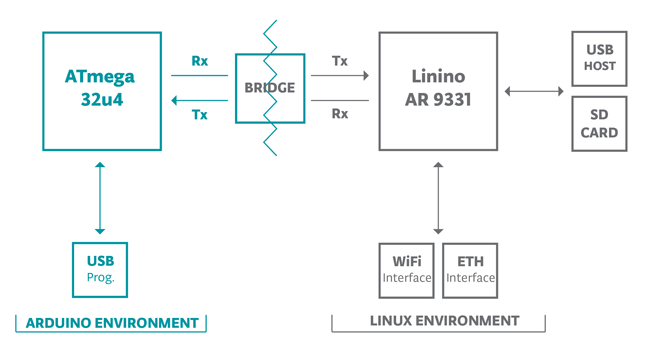
Thus, the final method is generated. The method is called USBIP. It is completely open source and could share USB device over IP. Of course, the technology could also be used in wifi. The USBIP project site could be accessed via: http://usbip.sourceforge.net/
The system diagram is modified.

First step: Since the robot arm is a usb device, the first step is to establish the wifi connection of two pcs and they can share the usb device.
Second step: the yun is acted as the server and the pc is the client. the yun can share its usb device over wifi to the computer.
In this method, the USBIP client used is the Windows PC with windows 8.1 Pro. Server computer runs ubuntu 12.04. The server and client packages could be downloaded from the USBIP project site.
There are two problems with this method.
First, the USBIP has not been updated for a long time. The latest Linux USBIP version dated back to 2009. It does not support ubuntu 12.04, but only ubuntu 10.04. This is the problem with the driver. The team recompiled the driver software based on the kernel and the problem is solved.
Second, the USBIP windows client and linux server version mismatch. Client version is 1.1.0 but server version is 1.0.6. The team viewed the code and changed the version information and finally they matched with each other.
The USBIP between two PCs are successful. Next challenging problem is that how to install USBIP into Yun's Linino OS. Cross compiling is used here. USBIP is compiled on PC into IPK files and stored into SD card. Then, SD card is pluged into Arduino Yun board and USBIP is installed into linino from the SD card.
The system is successful! :) We managed to control the robot arm over wifi using cyton viewer software (official robot arm control software by Robai).


No comments:
Post a Comment